
1) Click on "create customer" directly from the dashboard or find the same menu item under "Sales" in the menu bar.
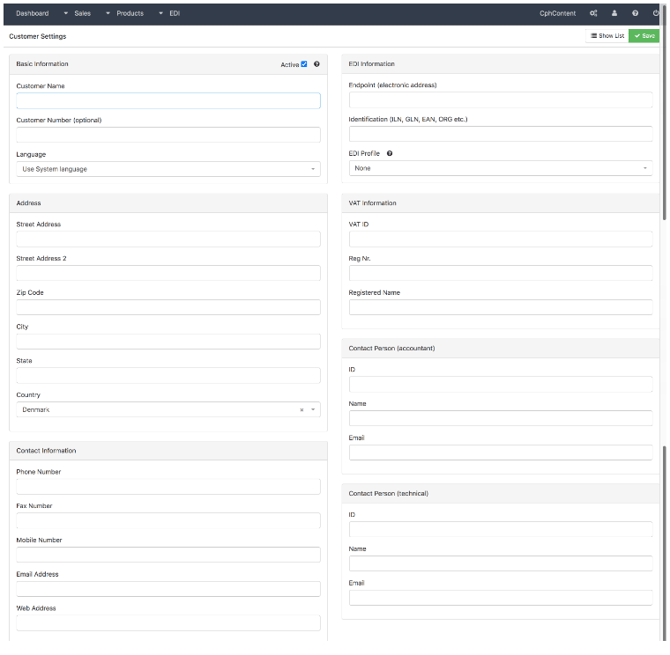
2) Basic information:
a. Enter the customer's name
b. You can choose to give the customer a customer number
3) Address:
a. Enter the customer's street, zip code, city, state and country.
4) Contact information:
a. Enter the contact information of your customer. You can enter phone number, fax number, email and
website
b. Find the boxes “Contact Person (accountant)” and “Contact Person (technical)” to add these
contacts to your customer. In the ID input field, you can enter an abbreviated name for the contacts,
e.g. their initials.
5) EDI Information:
a. Enter the customer's endpoint, where documents etc. will be sent to. It can be a GLN or EAN number.
b. Next, you must enter an identification number of the customer you are about to create. It can for
example be ILN, GLN, EAN or CVR number.
c. Select the customer's EDI profile. The EDI profile determines how documents are exchanged.
6) VAT information:
a. Enter the customer's VAT ID and registration number.
b. Also enter the legal name of the customer.
2) Basic information:
a. Enter the customer's name
b. You can choose to give the customer a customer number
3) Address:
a. Enter the customer's street, zip code, city, state and country.
4) Contact information:
a. Enter the contact information of your customer. You can enter phone number, fax number, email and
website
b. Find the boxes “Contact Person (accountant)” and “Contact Person (technical)” to add these
contacts to your customer. In the ID input field, you can enter an abbreviated name for the contacts,
e.g. their initials.
5) EDI Information:
a. Enter the customer's endpoint, where documents etc. will be sent to. It can be a GLN or EAN number.
b. Next, you must enter an identification number of the customer you are about to create. It can for
example be ILN, GLN, EAN or CVR number.
c. Select the customer's EDI profile. The EDI profile determines how documents are exchanged.
6) VAT information:
a. Enter the customer's VAT ID and registration number.
b. Also enter the legal name of the customer.
7) Click on the green "save" button at the upper right corner.